Table of Contents
- 1. The “Cinematic Look” Test: Optical Depth vs. AI Simulation
- 2. Low Light Performance: The “Parking Lot” Factor
- 3. Color Grading: 10-Bit ProRes Log vs. 8-Bit S-Log
- 4. Slow Motion and Frame Rates
- 5. The “Client Perception” Metric (For Entrepreneurs)
- Comparison at a Glance
- Quick Takeaways
- Conclusion: Which Should You Trust for Your Art?
- Frequently Asked Questions (FAQs)
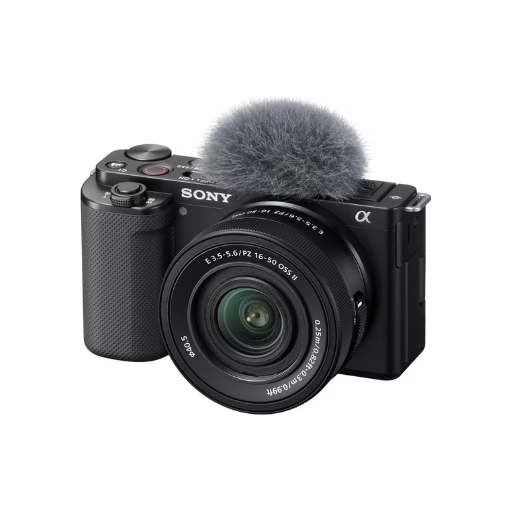
24.2MP APS-C Exmor CMOS Sensor and fast BIONZ X processor
4K Movie oversampled from 6k w/ full pixel readout, no pixel binning
If you are an independent artist or an aspiring director in 2025, you’ve likely heard the claim: “You don’t need a camera anymore. Just use your iPhone.”
On paper, it sounds convincing. The iPhone 15 Pro (and Pro Max) shoots ProRes Log, records directly to external SSDs, and fits in your pocket. But here is the reality check: shooting a travel vlog is very different from shooting a music video.
Music videos require performance capture in gritty low-light locations, reliable slow motion for B-roll, and—perhaps most importantly—a specific “look” that separates a professional production from a TikTok clip.
I’ve tested both the Sony ZV-E10 (paired with budget cinema lenses) and the iPhone 15 Pro specifically for music video workflows. We aren’t looking at specs for taking photos of your lunch; we are looking at dynamic range, skin tones under streetlights, and the ability to handle the chaotic movement of a Dancehall or Trap video shoot.
Here is the definitive breakdown of which tool deserves your budget this year.
1. The “Cinematic Look” Test: Optical Depth vs. AI Simulation
The hallmark of a high-budget music video is depth of field—that creamy, blurred background (bokeh) that isolates the artist from the clutter behind them. This is the number one thing that makes a video look “expensive.”
The Sony ZV-E10 Advantage
The ZV-E10 features an APS-C sensor, which is physically about 10x larger than the main sensor in the iPhone. When you pair this with a cheap prime lens like the Sigma 30mm f/1.4, you get real optical blur.
- Why it matters: Physics doesn’t glitch. If your artist is whipping their dreads, dancing aggressively, or waving their hands in front of the lens, the background blur remains smooth and consistent.
The iPhone 15 Pro Reality
The iPhone uses “Cinematic Mode” to simulate this blur using Artificial Intelligence. While it has improved massively in 2025, it still struggles with complex edges.
- The “Hair Halo” Problem: In performance shots with fast movement, the iPhone’s AI often fails to track strands of hair or fast fingers, creating a weird “halo” artifact that screams “smartphone footage.”
Winner: For static shots, it’s a tie. For performance scenes, the Sony ZV-E10 is the clear winner.
2. Low Light Performance: The “Parking Lot” Factor
Most independent music videos aren’t shot in perfectly lit studios. They are shot in alleys, clubs, or parking lots at 2 AM. This is where smartphone vs. mirrorless for videography becomes a crucial debate.
The Sensor Size Difference
Because the ZV-E10 has much larger pixels, it physically gathers more light. In dark environments, the iPhone 15 Pro has to rely on aggressive computational noise reduction. This often results in “smudged” skin textures that look like a watercolor painting rather than video.
ISO and Grain
- Sony ZV-E10: You can shoot at ISO 1600 or 3200 and still get usable, gritty film-like grain.
- iPhone 15 Pro: In low light, the footage often introduces digital “mud” in the shadows. While you can clean this up with software like Topaz Video AI, it adds hours to your editing workflow.
Pro Tip: If you do shoot with the iPhone in low light, turn off the default camera app. Use the Blackmagic Camera App (it’s free) to manually lock your shutter speed and ISO to stop the phone from over-processing your image.
3. Color Grading: 10-Bit ProRes Log vs. 8-Bit S-Log
Here is where the battle gets interesting. The iPhone 15 Pro actually has better color specs on paper than the original Sony ZV-E10.
iPhone 15 Pro (ProRes Log)
Filming music videos with iPhone 15 Pro Log is a game changer. It shoots 10-bit ProRes. This is a professional codec used in Hollywood. It captures billions of colors, allowing you to push and pull the image in post-production without it falling apart. You can turn a day shot into a moody blue evening shot easily.
- The Catch: File sizes are massive. One minute of 4K ProRes footage is roughly 6 GB. You must rig the iPhone with an external USB-C SSD (like a Samsung T7) to shoot this way.
Sony ZV-E10 (S-Log2 / S-Log3)
The ZV-E10 shoots in 8-bit. While S-Log allows for great dynamic range, 8-bit footage is fragile. If you try to grade the sky too aggressively, you will see “banding” (ugly lines where the colors separate).
- The Fix: To get the most out of the ZV-E10, you have to nail your exposure in-camera. You have less room to fix mistakes in post compared to the iPhone’s ProRes footage.
4. Slow Motion and Frame Rates
Slow motion is essential for music videos—think money falling, smoke rising, or dramatic walking shots.
- Sony ZV-E10: Records 1080p at 120fps. This gives you buttery smooth 5x slow motion, but you lose 4K resolution. The 4K mode is limited to 30fps.
- iPhone 15 Pro: Records 4K at 60fps (externally). This is a huge advantage if you want high-resolution slow motion. The iPhone creates crisper B-roll, provided you have enough light.
5. The “Client Perception” Metric (For Entrepreneurs)
This isn’t a technical spec, but it affects your bank account. If you are an entrepreneur trying to book clients, this matters.
If you are shooting a video for yourself, use whatever you want. But if you are charging an artist $500 to $2,000, appearance matters.
- The iPhone Problem: When you show up with a phone, the client often thinks, “I have an iPhone 15 too. Why am I paying you?”
- The Camera Authority: A Sony ZV-E10 rigged with a matte box, a cage, and a shotgun mic looks like a cinema tool. It commands respect on set and validates your pricing in the client’s eyes.
Comparison at a Glance
| Feature | Sony ZV-E10 (w/ Sigma lens) | iPhone 15 Pro (ProRes) | Winner |
| Background Blur | Natural, Optical | Artificial, AI-based | Sony |
| Low Light | Excellent | Good (but noisy) | Sony |
| Color Depth | 8-bit (Fragile) | 10-bit (Robust) | iPhone |
| Stabilization | Decent (Active Mode) | Incredible (Action Mode) | iPhone |
| Workflow Speed | Slow (Transfer cards) | Fast (Airdrop/Cloud) | iPhone |
| Set Presence | Professional | Amateur (unless rigged) | Sony |
Quick Takeaways
- Buy the Sony ZV-E10 if: You want to learn real cinematography, shoot mostly in low light/clubs, and want to look professional to clients. It is the best budget camera for rap music videos because of the lens options.
- Buy the iPhone 15 Pro if: You need 4K 60fps slow motion, you hate carrying heavy gear, and you have a powerful computer (M1/M2/M3 Mac) to edit huge ProRes files.
- The “Cheat Code”: The best setup for a beginner production house is actually both. Use the ZV-E10 for performance shots (bokeh) and the iPhone 15 Pro for wide gimbal shots and B-roll (stabilization).
24.2MP APS-C Exmor CMOS Sensor and fast BIONZ X processor
4K Movie oversampled from 6k w/ full pixel readout, no pixel binning
Conclusion: Which Should You Trust for Your Art?
In 2025, the gap between smartphones and cameras has blurred, but the Sony ZV-E10 remains the superior tool for music videos specifically because of interchangeable lenses.
The ability to swap to a wide lens for a hype performance shot and then a tight 50mm portrait lens for emotional close-ups gives you a creative palette that a phone cannot match physically. You aren’t just buying a camera; you’re buying into an ecosystem that grows with your career.
However, the best camera is the one that gets the video done. If you already own an iPhone 15 Pro, buy an external SSD and some lights, and start shooting. If you have $800 to spend and want to start a business, buy the ZV-E10.
Ready to level up your visuals? Don’t forget that lighting is more important than the camera. Check out my upcoming guide on The Best Budget Lights for Music Videos to see how to make either camera look like a movie.
Frequently Asked Questions (FAQs)
1. Can I use the iPhone 15 Pro for professional client work?
Yes, but perception is tricky. If you use an iPhone, I highly recommend “rigging it out” with a cage (like SmallRig or Beastgrip), an external monitor, and a side handle. This makes it look like a professional tool and helps justify your rates.
2. Do I really need an external SSD for the iPhone 15 Pro?
For music videos, yes. If you shoot in ProRes 4K, the files are massive (6GB per minute). Your internal phone storage will fill up after 2-3 takes. An external USB-C drive (like the Samsung T7 Shield) is mandatory for a smooth shoot.
3. Which camera is better for gimbal shots?
The iPhone 15 Pro wins here. Its “Action Mode” and internal stabilization are incredibly smooth, often eliminating the need for a gimbal entirely. The Sony ZV-E10 requires a motorized gimbal (like the DJI Ronin) to get truly smooth moving shots.
4. Is the Sony ZV-E10 good for slow-motion twerking/dancing shots?
It’s decent, but not 4K. The ZV-E10 shoots 120fps in 1080p HD. While this looks smooth, it is lower resolution than the iPhone’s 4K 60fps. If 4K resolution is your priority for slow motion, the iPhone wins.
5. What lens should I buy for the Sony ZV-E10 for music videos?
Skip the kit lens. Buy the Sigma 16mm f/1.4 (for wide performance shots) or the Sigma 30mm f/1.4 (for standard cinematic shots). These lenses let in tons of light and create that professional blurry background.